Sharp NZ: Managed Print Services for High-Performance New Zealand Workplaces.

Book a Demo
Get a Quote

Sharp NZ Managed Print Solutions: Secure Document Technology, Quantified ROI, and Local Support for New Zealand Organisations.

Sharp NZ Managed Print Services (MPS) provides a fully managed approach to printers, multifunction devices, print software, security, consumables and support. It helps New Zealand organisations move from reactive printer ownership to a proactive, secure and optimised print environment.

By combining print fleet optimisation, proactive monitoring, automated consumables management, print security and local service support, Sharp helps organisations reduce print costs, minimise downtime, improve document security and reduce the administrative burden on IT teams.

Managed Print Services at a Glance

  • From $100 per month: Professional Managed Print Services solutions for New Zealand organisations.
  • 30–90 day improvement window: Organisations can identify and begin realising measurable cost and operational improvements within the first 30–90 days, depending on fleet size and requirements.
  • 180-Day Optimisation Framework: A structured approach spanning Stabilisation, Optimisation and Transformation to continuously improve the print environment.
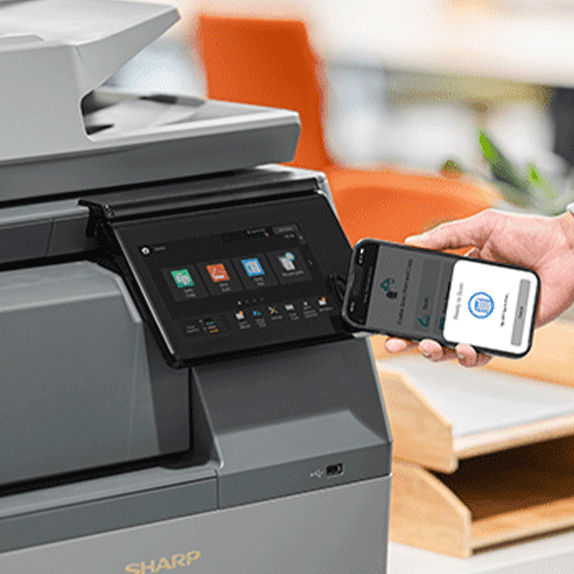
  • Secure by design: Layered print security including user authentication, Secure Print Release, access controls, encrypted communications and device security.
  • Microsoft integration: Support for identity and authentication environments including Microsoft 365 and Microsoft Entra ID.
  • Print workflow integration: Integration with solutions including PaperCut and Umango to improve print management and reduce IT administration.
  • Scalable from 10 to 5,000+ users: Managed print solutions designed for small, medium and enterprise organisations, including multi-site environments.
  • Nationwide support: Local Sharp service and support across Auckland, Wellington, Christchurch and locations throughout New Zealand.
  • NZ-focused governance: Print security and document management considerations aligned with the New Zealand Privacy Act 2020, with sustainability considerations informed by ISO 14001 environmental management principles.

In Short: What Is Managed Print Services?

Managed Print Services (MPS) is a structured approach to managing an organisation's entire print environment — including hardware, print volumes, consumables, software, security, service and ongoing costs.

Sharp NZ MPS helps organisations identify unnecessary print expenditure, right-size their printer fleet, improve device utilisation, automate consumables management, strengthen document security and reduce printer-related IT workload.

For organisations with 10 to 5,000+ users, MPS provides a scalable framework for managing printing across individual offices or multiple New Zealand locations.

Sharp NZ vs. Competitor Selection Guide (Managed Print Services)

Selection Factor Sharp NZ Managed Print ServicesCompetitor Standard (Generic) Business Value Proposition
Fleet Methodology 180-Day Managed Print Optimisation Framework.Standard installation with reactive device support.Provides measurable results within 30–90 days through structured milestones.
Endpoint SecurityLayered Security with optional Bitdefender® Antimalware.Generic firewall protection; non-integrated security.Protects sensitive corporate data directly at the device endpoint.
Financial Entry PointSolutions starting from $100 p/m.High upfront capital or complex tiered pricing.Preserves capital for core business growth and improves cash flow.
Financing ModelFlexible in-house financing and leasing.Third-party finance with complex, fragmented contracts.Simplifies budgeting through a single trusted partner for both technology and finance.
Support NetworkNationwide NZ Network with defined SLAs.Centralised support with limited local regional presence.Ensures maximum uptime with rapid local response across all NZ regions.
Native IntegrationMicrosoft 365, PaperCut, and Umango.Manual configuration or multi-vendor software contracts.Reduces IT burden via a unified document and workflow ecosystem.
A Product of Sharp

What causes unmanaged print costs?

The cost of printing is not limited to the price of paper and toner. The total cost of a print environment can also include printer hardware, maintenance, consumables, energy, IT support, administration, downtime and unnecessary printing.   

For this reason, organisations should assess total print costs rather than simply comparing the purchase price of individual printers or multifunction devices.

A Managed Print Services assessment can identify:

  • How many print devices an organisation has
  • Where devices are located
  • Which devices are underused or overused
  • How much each device is printing
  • The proportion of colour versus monochrome printing
  • Consumable usage and replacement patterns
  • Printer-related IT support requirements
  • Opportunities to consolidate or replace devices
  • Print security risks
  • Opportunities to reduce unnecessary printing
Get in touch

TCO & ROI Hub: How Print Costs Are Reduced

A Managed Print Services model improves Total Cost of Ownership (TCO) through measurable optimisation levers.
A Product of Sharp

Cost reduction methodology includes:

1. Cost-per-page benchmarking

  • Standardised pricing across mono and colour printing
  • Identification of high-cost print behaviours
  • Elimination of device inefficiencies

2. Lease vs Buy optimisation

  • Leasing aligns costs to usage and lifecycle
  • Avoids capital depreciation risk
  • Includes service, consumables, and maintenance in one model

3. Fleet right-sizing

  • Removing underutilised devices
  • Consolidating overlapping printers
  • Matching device capability to department need

4. Behavioural optimisation

  • Default duplex printing
  • Colour print controls for non-essential output
  • User-level reporting visibility
A Product of Sharp

Managed Print Managed Print Implementation & Onboarding Milestones

  • Consultative Discovery: We begin with a full document workflow audit and network readiness assessment to identify critical inefficiencies and security requirements.
  • Standard Implementation Milestones:
    • Phase 1 (Stabilisation): Focus on device mapping, service consolidation, and initial fleet governance.
    • Phase 2 (Optimisation): Deployment of automated print rules (e.g., duplex-by-default) and activation of usage reporting dashboards.
    • Phase 3 (Transformation): Full integration of security lifecycle processes and proactive sustainability reporting.
  • Collaborative Onboarding: Our nationwide support network provides a clear escalation path, ensuring IT Managers have a predictable transition and long-term uptime.

Sharp NZ: Day-1 Office Hardening Checklist (IT Manager’s Guide)

Objective: To establish an immediate security baseline for all multifunction printers (MFPs) and document workflows upon deployment, ensuring alignment with the New Zealand Privacy Act 2020.  

1. Identity & Access Management (IAM)

  • Entra ID / Microsoft 365 Integration: Synchronise device access with existing corporate credentials to eliminate generic "Guest" printing.
  • Secure Print Release (Pull-Printing): Enable "Follow-Me" print workflows to ensure sensitive documents are only released when the user is physically at the device.
  • Role-Based Access Control (RBAC): Restrict advanced features (like scan-to-external-folders or colour printing) based on specific user roles or departments.

2. Endpoint Protection & Network Security

  • Antimalware Activation: Confirm Bitdefender® Antimalware is active and configured for real-time scanning of all incoming and outgoing document data.
  • Firmware Lifecycle Management: Automated scheduling for critical security patches and firmware updates to mitigate zero-day vulnerabilities.
  • Port & Protocol Hardening: Close non-essential network ports and disable legacy protocols (e.g., FTP, Telnet) to reduce the device's attack surface.

3. Document & Data Privacy

  • Automatic Storage Encryption: Verify that all data stored on internal device drives is encrypted using 256-bit AES standards.
  • Data Overwrite (End-of-Session): Configure the device to automatically overwrite temporary image data on the hard drive after every scan, copy, or print job.
  • Secure Scan-to-Cloud: Establish encrypted "scan-to-folder" paths directly into secure environments like OneDrive or SharePoint.

4. Fleet Governance & Monitoring

  • User-Level Tracking: Activate detailed logging for all device interactions to maintain a clear audit trail for compliance purposes.
  • Automated Security Alerts: Set up real-time IT notifications for unauthorized access attempts or suspicious data spike.
  • Standardised Print Rules: Deploy "duplex-by-default" and "black-and-white default" rules to reduce unmanaged paper waste and physical data exposure.

Why Sharp Managed Print Services?

Sharp delivers integrated print solutions designed for modern business environments, combining hardware, software, service, and governance into one managed ecosystem.

Get a Quote

What Problems Does MPS Solve? 

Many organisations know they are spending too much time and money managing printers, but cannot easily identify where the costs are coming from. A print fleet can include different printer models, ageing devices, unmanaged consumables, unnecessary colour printing, inefficient print locations and repeated IT support requests.

Managed Print Services (MPS) addresses this problem by assessing, monitoring and managing an organisation's entire print environment to reduce unnecessary costs, improve productivity, strengthen print security and make printing easier to manage.

The problem → symptom → cause → impact → next step

Business Problem Common SymptomsLikely CauseMeasurable Business Impact  Recommended Next Step
Printing costs are too high Unexpected print bills, excessive toner use and unnecessary colour printing No visibility of total print costs or user/device behaviour Higher operating costs and wasted consumables Conduct a print fleet assessment and establish a baseline cost per page and total print spend  
IT spends too much time supporting printers Frequent printer-related help desk requests, driver issues and device troubleshooting Unmanaged or inconsistent printer fleet IT resources are diverted from strategic technology projects Standardise devices and move day-to-day print management to an MPS provider  
Printers are regularly out of service     Empty toner, service issues and users unable to print when required Reactive rather than proactive fleet management Lost employee productivity and avoidable downtime   Introduce remote monitoring, proactive servicing and automated consumables management  
The organisation has too many printers     Devices are underused while others are overloaded Print fleet has grown without regular optimisation Unnecessary equipment, maintenance, energy and supply costs   Analyse device utilisation and right-size the print fleet 
Sensitive documents are printed insecurely     Documents are left in printer output trays or users print confidential information unnecessarily Lack of authentication and secure print release   Increased risk of confidential information being accessed by the wrong person   Implement secure print release and user authentication  
Printing is difficult across multiple locations Different devices, interfaces, drivers and suppliers across offices Decentralised print procurement and management Higher administration costs and inconsistent user experience   Consolidate print management under a standardised MPS strategy  
Print expenditure is difficult to forecast     Variable invoices and unexpected equipment or consumable costs Multiple suppliers, contracts and unmanaged purchasing Less predictable operating expenditure  Consolidate equipment, service and consumables into a managed print agreement
The organisation wants to reduce paper waste     Excessive printing, abandoned print jobs and unnecessary duplicate documents Limited visibility or controls over printing behaviour Higher paper, toner and energy consumption Introduce print rules, reporting, secure release and user awareness measures

A Product of Sharp

Fleet Governance: Control, Compliance & Efficiency

Governance ensures print behaviour aligns with business objectives.

Standard governance controls include:

  • Duplex-by-default printing to reduce paper consumption
  • Colour print restrictions for non-essential workflows
  • User-level tracking and reporting for accountability
  • Departmental cost allocation (chargeback models)
  • Print rules based on user roles or departments

Outputs include:

  • Monthly usage reports
  • Cost allocation summaries
  • Device utilisation insights
  • Sustainability metrics

A Product of Sharp

Nationwide Service & SLA Coverage

Sharp Managed Print Services provides nationwide support across New Zealand with structured service level agreements (SLAs) designed for business continuity.

Service model includes:

  • Remote diagnostics and monitoring
  • Local certified technicians across major regions
  • Priority response service levels (including rapid-response priority tiers)
  • Proactive maintenance to reduce downtime
A Product of Sharp

Sustainability Reporting & Environmental Responsibility

Sharp Managed Print Services supports measurable sustainability outcomes aligned with ISO 14001 environmental management principles.

Sustainability initiatives include:

  • ISO 14001-aligned operational practices
  • Free toner cartridge recycling programme
  • Reduced paper consumption through duplex defaults
  • Fleet consolidation to reduce energy usage
  • Lifecycle optimisation to extend device lifespan
Find out more

Frequently Asked Questions

Learn more about this in our Workplace Technology Glossary.

What measurable impact can Managed Print Services deliver?

The potential benefits of MPS depend on the organisation's existing print environment, but the primary areas for measurement are clear.

Print cost: Establish total monthly and annual print expenditure before implementing changes, then measure the cost after fleet optimisation.

Device utilisation: Identify underused and overloaded devices to determine whether the fleet is appropriately sized for actual demand.

IT support: Track printer-related help desk requests and the amount of IT time spent resolving print issues.

Downtime: Measure device outages and the time users are unable to print.

Consumables: Monitor toner and other consumable usage to identify unnecessary consumption and improve replenishment.

Security: Measure adoption of secure print release, authentication and other print security controls.

Sustainability: Track print volumes, colour usage, paper consumption and device energy efficiency to identify opportunities to reduce environmental impact.

What is the recommended next step?

The best starting point for an organisation considering Managed Print Services is a print fleet assessment.

print assessment establishes a baseline of the current environment before recommending changes. It can help answer five important questions:

  1. What are we currently spending on printing?
  2. Where are our biggest sources of print waste?
  3. Are our printers and multifunction devices being used efficiently?
  4. What print security risks do we currently have?
  5. What changes could reduce costs while maintaining the printing capability our people need?

Sharp can assess your existing print environment and recommend a Managed Print Services strategy based on your organisation's users, locations, print volumes, security requirements and business objectives.

The goal is not simply to have fewer printers. The goal is to create a print environment that is easier to manage, more secure and aligned with the way your organisation actually works.

Related Articles