
What is PaperCut?
PaperCut is print management software that helps organisations monitor, control and secure printing, copying and scanning. It sits across your print environment and gives IT teams and business leaders more control over how documents are printed, who can access them, how scan workflows are used and where costs are being generated.
PaperCut can be used to support:
- secure print release
- user authentication at the device
- print tracking and reporting
- print rules and quotas
- scan workflow controls
- cost allocation by team, site or client
- management of multi-vendor printer fleets
Sharp NZ acts as the supplier, advisor and implementation partner, while PaperCut is the software platform and Sharp MFPs provide the hardware environment where needed.

Supporting New Zealand Privacy and information handling requirements
For many organisations, print security is no longer just about convenience or cost. It is also part of broader information governance and privacy risk management.
Sharp’s PaperCut implementations can help organisations support their document security controls and strengthen practices relevant to obligations under the New Zealand Privacy Act 2020, particularly where printed or scanned documents contain personal, financial, student, health or employee information.
Examples include:
- reducing abandoned confidential printouts at shared devices
- requiring user authentication before release of sensitive documents
- limiting access to scan destinations and device functions
- improving visibility over who printed or scanned what, and when
- applying policies to support more controlled document handling
PaperCut is not a replacement for broader privacy, security or legal advice, but it can play an important role in a more secure workplace print environment.
Common PaperCut use cases
Secure print release
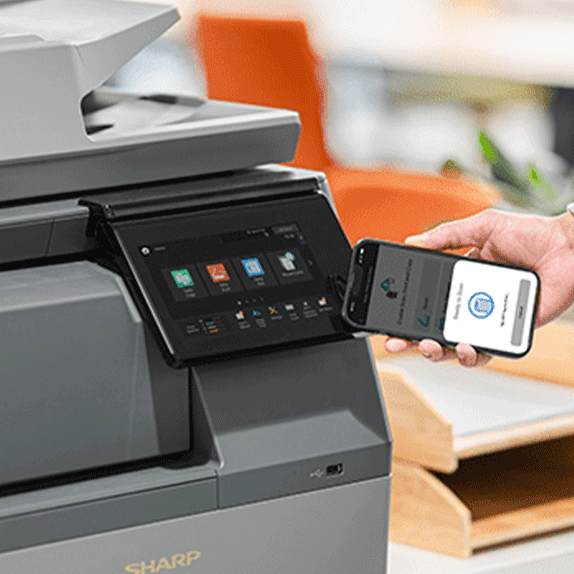
Hold print jobs until the user authenticates at the device. This helps reduce abandoned documents, improve confidentiality and give users flexibility over where they collect their printing.
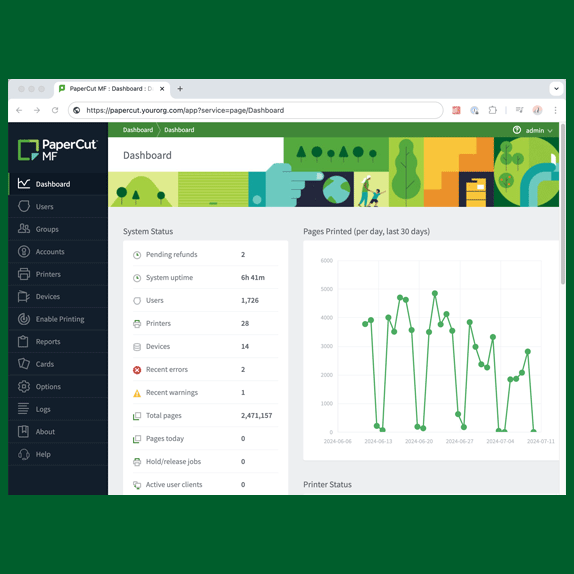
Print tracking and reporting
Track usage by user, department, site or device to identify trends, monitor costs and support print reduction initiatives.
Print rules and quotas
Set policies around colour printing, duplex defaults, high-volume jobs or user allowances to reduce unnecessary spend.
Scan workflow control
Support more controlled scanning from shared devices by authenticating users and directing scans to approved destinations.

Multi-site print management
Apply consistent print controls and reporting across schools, branch offices and distributed workplaces.
Shared fleet visibility
Manage printing across Sharp and non-Sharp devices with clearer reporting and policy control.
A practical PaperCut solution for New Zealand organisations
Sharp NZ works with organisations to deploy PaperCut in a way that fits local business requirements, internal IT capability and existing infrastructure. Our role typically includes solution design, configuration, rollout support, user setup, device integration and ongoing service.
We commonly help organisations use PaperCut for:
- secure print release across office and school environments
- print tracking by user, team, campus or cost centre
- scan workflow controls for shared multifunction devices
- reducing print waste in high-volume environments
- supporting hybrid work print access
- standardising print controls across multiple locations
- integrating print management into a broader managed print strategy

A practical PaperCut solution for New Zealand organisations
Sharp NZ works with organisations to deploy PaperCut in a way that fits local business requirements, internal IT capability and existing infrastructure. Our role typically includes solution design, configuration, rollout support, user setup, device integration and ongoing service.
We commonly help organisations use PaperCut for:
- secure print release across office and school environments
- print tracking by user, team, campus or cost centre
- scan workflow controls for shared multifunction devices
- reducing print waste in high-volume environments
- supporting hybrid work print access
- standardising print controls across multiple locations
- integrating print management into a broader managed print strategy

Local implementation and support from Sharp NZ
Sharp NZ provides local advice, deployment support and ongoing service for PaperCut solutions in New Zealand. Our teams work with schools, commercial businesses and multi-site organisations to align software, devices and print policy settings with operational needs.
Support is backed by Sharp’s New Zealand service presence, including teams supporting customers in Auckland, Wellington and Christchurch.
That means you are working with a local provider that can assist with:
- pre-deployment planning
- Sharp MFP configuration
- PaperCut setup and rollout
- secure print release workflows
- reporting configuration
- user onboarding and admin guidance
- ongoing optimisation and support

Is PaperCut right for your organisation?
PaperCut is typically a strong fit if your organisation wants to:
- improve print security and reduce confidential documents sitting in output trays
- understand where print costs are coming from
- reduce unnecessary printing and improve sustainability
- manage printing across multiple offices, campuses or teams
- introduce print accountability without replacing every device
- support a managed print strategy with better software visibility and control
- improve the user experience for shared devices or hybrid work environments
It can be used by organisations of many sizes, from smaller teams of around 10 users through to large organisations with 5,000+ users.
The Sharp approach to print management
Sharp NZ does not treat PaperCut as standalone software. We use it as part of a broader print management strategy that aligns devices, users, security settings, workflows and reporting.
Where appropriate, we can deploy PaperCut within Sharp’s wider managed print and optimisation approach, helping organisations improve:
- print visibility
- document security
- user access control
- device utilisation
- workflow efficiency
- fleet governance and reporting
This ensures the solution is not just installed, but configured to support practical business outcomes.

Related PaperCut resources
To help IT teams, school administrators and operations leaders go deeper, Sharp NZ can also provide guidance on related PaperCut topics such as:
- Sharp + PaperCut Integration Guide – deployment planning, device setup, driver deployment and network considerations
- How to Use Secure Print Release on Sharp MFPs – PIN, authentication and job release workflows
- PaperCut Reporting Guide – what to track, what reports matter and how to use data for optimisation
- Common PaperCut Issues and Troubleshooting – practical checks for print queues, authentication, scan workflows and user access
Found what you're looking for?
Search our website for products, FAQs, software and drivers here...