Print Security Explained: Why It’s a Must-Have for Cyber Safety
Office Print Security Business Case at a Glance
Why Print Security Matters for New Zealand Organisations
Modern multifunction printers (MFPs) are no longer standalone office devices. They are connected workplace endpoints that process, store, and transmit sensitive business information.
For New Zealand organisations, print security should be treated as part of a broader information security strategy — protecting confidential documents, reducing unauthorised access risks, and supporting obligations under the New Zealand Privacy Act 2020.
| Security Consideration | Business Impact |
| Risk Area | Unauthorised access to printed, scanned, or stored documents |
| Regulatory Alignment | Supports reasonable security safeguards under Privacy Act 2020 Principle 5 (Storage and Security) |
| Primary Controls | Secure Print Release, user authentication, device hardening, encryption, monitoring |
| Operational Outcome | Reduced document exposure, improved accountability, stronger governance |
| Deployment Support | Nationwide Sharp NZ service capability across Auckland, Wellington, Christchurch and regional locations |
Key Takeaways: Office Print Security in NZ
✓ Printers are network-connected endpoints and should be managed alongside other business technology assets.
✓ Secure Print Release reduces document exposure by ensuring confidential documents are only released when an authorised user is physically present.
✓ Device hardening improves security posture by reducing unnecessary access points and ensuring security settings align with organisational requirements.
✓ Print security supports Privacy Act 2020 obligations by helping organisations implement reasonable safeguards for protecting personal information.
✓ Managed Print Services provide ongoing governance through device monitoring, fleet optimisation, security reviews, and lifecycle management.
Why Office Print Security Is a Business and Compliance Requirement
Printers Are Often an Overlooked Cybersecurity Risk
Cybersecurity strategies traditionally focus on computers, servers, cloud applications, and employee devices.
However, modern multifunction printers perform many of the same functions as other connected workplace technologies.
Today’s MFPs can:
- Store documents temporarily
- Scan information directly into business systems
- Connect with cloud applications
- Authenticate users
- Communicate across corporate networks
- Process confidential information
This means printers should be managed as part of an organisation’s overall security framework.
The Privacy Act 2020 and Print Security Responsibilities
New Zealand organisations that collect, store, or process personal information have obligations under the Privacy Act 2020.
Privacy Principle 5 requires organisations to take reasonable safeguards to protect personal information from:
- Loss
- Unauthorised access
- Unauthorised disclosure
- Misuse
Printed documents containing personal information remain part of the information lifecycle.
Examples include:
- Customer records
- Employee information
- Financial documents
- Healthcare information
- Legal documents
- Contracts
A secure print environment helps organisations strengthen their controls around how information is accessed, printed, collected, and managed.
Common Office Print Security Risks
1. Unclaimed Confidential Documents
One of the simplest but most common print security risks occurs when documents are left unattended at printers.
Examples include:
- Payroll reports
- Customer information
- Contracts
- Employee records
- Financial statements
Secure Print Release helps address this risk by holding documents until the authorised user authenticates at the device.
2. Unsecured Network Devices
Like computers and other connected devices, printers require appropriate security configuration.
Potential risks include:
- Default administrator settings
- Unrestricted access
- Outdated firmware
- Poor user controls
- Unsecured communication channels
3. Lack of Visibility and Governance
Many organisations do not have complete visibility over:
- Who is printing
- What devices are connected
- Where sensitive documents are being produced
- Whether security settings are consistently applied
Effective print governance provides greater control and accountability.
How Sharp NZ Helps Secure Office Print Environments
Sharp NZ takes a layered security approach designed to protect devices, documents, and workflows.
1. Secure Print Release
Secure Print Release ensures confidential documents remain protected until the authorised user authenticates at the device.
Benefits include:
- Reduced abandoned documents
- Improved confidentiality
- Greater user accountability
- Better control over sensitive information
2. User Authentication and Access Controls
Authentication controls help ensure only approved users can access device functions.
Options may include:
- PIN authentication
- Network credentials
- User access permissions
- Card authentication solutions
3. Device Hardening
Device hardening involves configuring printers with security best practices before they are deployed into a business environment.
This may include:
- Reviewing administrator settings
- Controlling access permissions
- Enabling encryption
- Managing firmware security
- Disabling unnecessary functions
4. Data Protection and Encryption
Sharp multifunction printers incorporate security features designed to protect information during:
- Document transmission
- Storage
- Printing
- Scanning workflows
5. Malware Protection and Security Monitoring
Selected Sharp MFP solutions include additional security technologies such as Bitdefender antimalware protection to provide another layer of defence against malicious activity.
For larger organisations, print security can also form part of broader monitoring and governance strategies.
Print Security and Managed Print Services: Moving From Devices to Governance
Security is not only about choosing a secure printer.
A mature print security strategy requires ongoing management.
Managed Print Services (MPS) help organisations create visibility and control through:
- Device assessments
- Fleet optimisation
- Usage monitoring
- Security reviews
- Lifecycle management
- Proactive support
By combining security controls with print governance, organisations can better understand their print environment and identify opportunities to reduce risk and cost.
Explore the Business Case for Managed Print Services
Understanding security risk is only one part of the decision process.
Organisations also need to understand:
- Current print costs
- Efficiency opportunities
- Fleet optimisation
- Long-term ROI
Learn more: Managed Print Services ROI & Business Case Guide NZ
- red on device memory
How does Sharp protect multifunction printers?
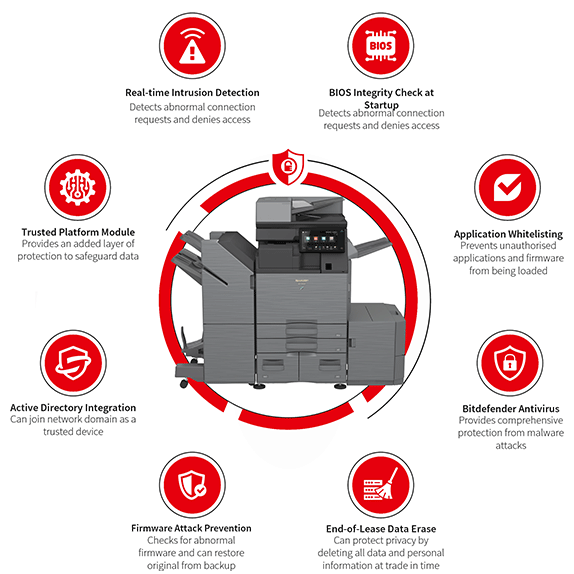
Sharp uses a layered security approach designed to protect devices, documents, and workflows.
Security features available across Sharp multifunction printers include:
- User authentication
- Secure print release
- Data encryption
- Firmware protection
- Access controls
- Security configuration services
- Malware protection options including Bitdefender technology
- Integration with security monitoring environments
What is secure print release?
Secure print release allows documents to remain protected until the authorised user authenticates at the printer.
Instead of documents immediately printing and sitting unattended in an output tray, users can release their documents securely using authentication methods such as:
- PIN codes
- User login credentials
- Access cards
This reduces the risk of confidential documents being viewed or collected by the wrong person.
Office Print Security Checklist for IT Managers
Before reviewing your print environment, ask:
☐ Are printers included in cybersecurity policies?
☐ Are users authenticated before collecting confidential documents?
☐ Are default administrator credentials removed?
☐ Are firmware updates managed?
☐ Are unused device functions disabled?
☐ Is print activity visible and auditable?
☐ Are retired devices securely cleared?
☐ Does your print environment support Privacy Act 2020 obligations?
Office Print Security Glossary
MFP (Multifunction Printer)
A connected office device that combines printing, scanning, copying, and document workflow capabilities.
Secure Print Release
A print workflow where documents are held securely until an authorised user authenticates at the device.
Pull Printing
Another term for secure print release where users “pull” their documents from the printer after authentication rather than sending documents directly to an output tray.
Device Hardening
The process of configuring technology devices with security controls to reduce vulnerabilities and minimise unnecessary access.
SLA (Service Level Agreement)
A documented commitment defining expected service response times, support levels, and performance standards.
Frequently Asked Questions
Why is printer security important in New Zealand?
Printer security is important because modern printers process sensitive business information and are connected to organisational networks. Secure print controls help businesses reduce unauthorised access risks and strengthen information protection practices.
Are printers covered by the Privacy Act 2020?
While the Privacy Act 2020 applies to personal information handling rather than printers specifically, organisations must take reasonable safeguards to protect personal information throughout its lifecycle — including when information is printed, stored, or processed through MFP devices.
What is the most effective way to secure office printers?
A strong print security approach combines secure print release, user authentication, device hardening, encryption, monitoring, and ongoing management.
Can secure printing reduce confidential document risks?
Yes. Secure printing reduces the chance of confidential documents being left unattended because documents are only released after authorised user authentication.
Should printers be included in cybersecurity assessments?
Yes. Printers should be reviewed as connected workplace endpoints alongside computers, servers, and other network devices.
How does Sharp NZ support print security?
Sharp NZ helps organisations improve print security through secure multifunction printers, workflow solutions, security configuration services, and managed print services designed for New Zealand business environments.
Strengthen Your Office Print Security Strategy
Your print environment contains valuable business information. Protecting it requires more than choosing the right printer — it requires visibility, governance, and security controls designed for the modern workplace.
Sharp NZ helps organisations across New Zealand secure their document workflows with trusted print technology, managed services, and security-focused solutions.
Talk to Sharp NZ about creating a more secure and controlled print environment.
Request a Print Security Assessment Today
