Visual Technology Selector: Enterprise Guide
The Enterprise Visual Technology Matrix: Choosing Between dvLED, Large Format Displays, Interactive Touchscreens, Digital Signage & Laser Projectors
Choosing the right visual technology for an enterprise, education, public sector or commercial environment is about more than screen size or resolution. The best solution depends on the space, viewing distance, ambient light, audience size, content type, operating hours, interaction requirements and installation environment.
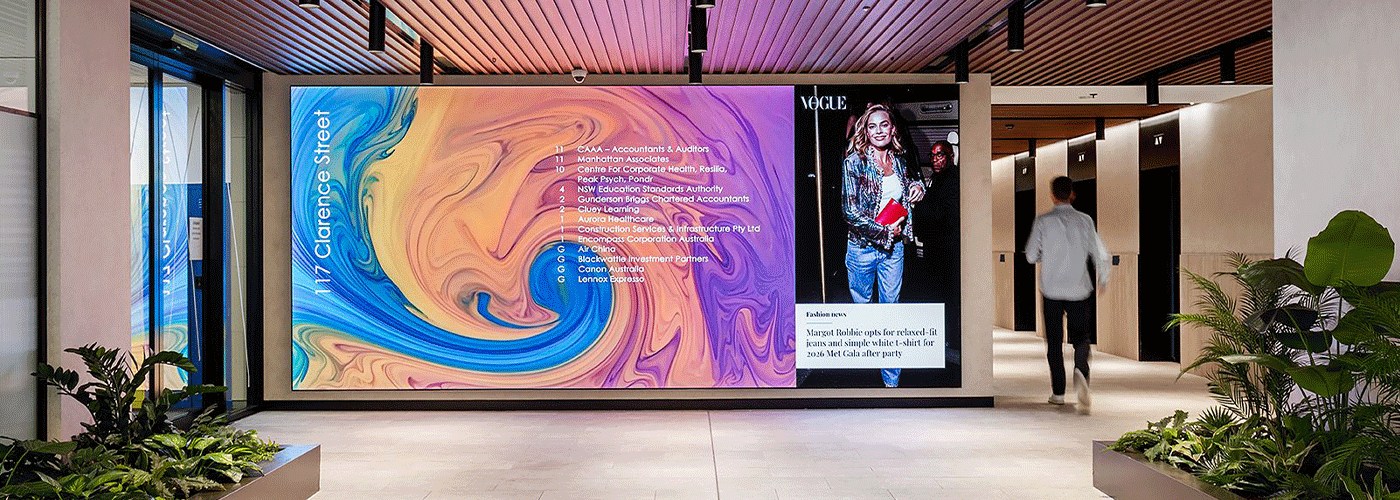
For example, an 86-inch commercial display can be an excellent choice for an executive meeting room, while a high-brightness digital signage display may be better suited to a retail window. A laser projector can deliver a much larger image economically in a lecture theatre, while a dvLED wall can provide a seamless visual centrepiece in a corporate foyer or auditorium.
Sharp NZ's visual solutions portfolio covers these different requirements across five core technology categories:
- dvLED tile walls for seamless, scalable large-format visual environments
- Large Format Displays (LFDs) for professional, high-usage display applications
- Interactive Touch Displays for collaboration, meetings and learning
- Commercial Digital Signage Displays for customer communications and high-brightness environments
- Professional Laser Projectors for very large images in auditoriums, lecture theatres and venues
The right choice is therefore not simply "which display is best?" It is which visual technology is best suited to the environment and intended outcome?
Enterprise Visual Technology Decision Matrix
The table below provides a starting point for selecting the appropriate visual technology.
| Visual technology | Representative Sharp series | Best suited to | Key strengths | Typical consideration |
|---|---|---|---|---|
| dvLED Tile Walls | Sharp dvLED solutions | Corporate foyers, auditoriums, control rooms, broadcast environments | Seamless imagery, scalable dimensions, high contrast, architectural flexibility | Best for high-impact installations requiring a custom-sized visual canvas |
| Large Format Displays | PN-ME, PN-M, PN-P | Boardrooms, dashboards, briefing rooms, public venues, control environments | 4K resolution, professional connectivity, 24/7 operation, commercial reliability | Best where a fixed large screen is preferable to projection |
| Interactive Touch Displays | PN-LC, PN-LM, PN-L2B | Meeting rooms, classrooms, training rooms and collaborative spaces | Touch interaction, digital whiteboarding, Windows Ink, USB-C connectivity | Best where users need to interact directly with content |
| Digital Signage Displays | PN-HY, PN-HS | Retail, reception, windows, wayfinding, public spaces | High brightness, portrait/landscape installation, centralised content management | Best where content must remain highly visible in bright environments |
| Laser Projectors | P-Series, V-Series, A-Series | Lecture theatres, auditoriums, museums and large venues | Very large image sizes, high brightness, laser light source, flexible installation | Best where a 100-inch-plus image is required economically |
Simple rule: choose the technology based on the environment first, then the screen size.
How to Choose the Right Enterprise Visual Technology
There are several questions organisations should answer before selecting a display or projection system.
1. How large does the image need to be?
Screen size is one of the first considerations.
For smaller meeting rooms, training rooms and classrooms, a 65-inch, 75-inch or 86-inch commercial display may provide an appropriate viewing experience without requiring projection equipment.
As room size increases, however, a single flat-panel display may become impractical. Large auditoriums and lecture theatres can require images well beyond 100 inches, making professional laser projection or dvLED an attractive option.
2. How much ambient light is present?
Ambient light has a significant effect on perceived image quality.
Bright reception areas, retail windows and public spaces may require high-brightness commercial signage displays to maintain visibility during daylight hours.
Controlled environments can provide more flexibility. Projection can work particularly well in lecture theatres and auditoriums where lighting can be managed around the screen.
3. Does the audience need to interact with the display?
If users need to write, annotate, manipulate content or collaborate directly on screen, an interactive display is generally more appropriate than a conventional LFD or signage display.
Interactive displays can support:
- Digital whiteboarding
- Annotation
- Collaborative workshops
- Presentation control
- Hybrid meetings
- Classroom learning
- Training sessions
- Windows-based workflows
4. Does the display need to operate continuously?
For corporate, public-sector and commercial environments, operating requirements can be just as important as image quality.
Displays installed in control rooms, transport environments, public venues and other high-usage applications may need to support extended operating schedules.
This is where professional LFDs and commercial signage displays differ from consumer televisions. Commercial products are designed around professional installation, connectivity, thermal management, reliability and deployment requirements.
5. Does content need to be centrally managed?
If an organisation has multiple displays across offices, campuses, stores or facilities, manually updating every screen quickly becomes inefficient.
A professional digital signage platform can allow content to be created, scheduled and distributed centrally, helping organisations manage communications across multiple locations.
1. dvLED Tile Walls: Bezel-Free Architectural Visuals
dvLED, or direct-view LED, uses individual LED modules to create a large digital canvas.
Unlike conventional LCD displays, dvLED installations are constructed from individual modules or cabinets. This makes them highly scalable and allows the final display to be designed around the architecture of the space.
When should you choose dvLED?
dvLED is particularly suited to environments where the visual installation itself is part of the architecture or where a very large seamless image is required.
Typical applications include:
- Corporate headquarters
- Reception and foyer installations
- Executive experience centres
- Large auditoriums
- Broadcast environments
- Control rooms
- Brand experience spaces
- Large public venues
Why choose dvLED?
The major advantage is scale without conventional display bezels.
A dvLED wall can be configured to suit different aspect ratios and architectural dimensions, allowing organisations to create a visual surface that would be difficult or impossible to achieve with conventional flat-panel displays.
It can also provide high contrast and strong visual impact for corporate branding, presentations, live information and immersive content.
Best use case
Choose dvLED when the visual installation needs to become a major architectural feature or when a large seamless display is required.
2. Large Format Displays: Professional 24/7 Display Performance
Large Format Displays, or LFDs, are professional commercial displays designed for business and institutional environments.
Sharp's professional display portfolio includes the PN-ME, PN-M and PN-P Series, providing options across a range of screen sizes, including large-format displays up to 98 inches.
When should you choose an LFD?
LFDs are particularly useful where an organisation needs a large, high-resolution display without the complexity of a projection system.
Typical applications include:
- Executive boardrooms
- Briefing rooms
- Corporate dashboards
- Control rooms
- Reception areas
- Healthcare environments
- Public venues
- Education facilities
- Digital information displays
Why choose an LFD instead of a consumer TV?
Professional displays are designed around commercial deployment requirements rather than primarily home entertainment.
Depending on the model, commercial features can include:
- Professional connectivity
- Extended operating capability
- Commercial thermal management
- Installation flexibility
- Remote management capabilities
- Professional warranty and support options
For an organisation deploying displays across multiple rooms or sites, these considerations can be more important than simply comparing consumer television specifications.
Best use case
Choose an LFD when you need a large, professional display for continuous or high-frequency business use without requiring touch interaction or projection.
3. Interactive Touch Displays: Collaboration Beyond the Screen
Interactive displays transform the display from a passive viewing surface into a collaborative workspace.
Sharp's interactive display portfolio includes the PN-LC and PN-L2B Series, designed for applications including meetings, education, training and collaborative work.
When should you choose an interactive display?
An interactive display makes sense when people need to actively work with the content rather than simply view it.
Typical applications include:
- Hybrid meetings
- Training rooms
- Classrooms
- University teaching spaces
- Workshops
- Agile project rooms
- Collaborative planning
- Brainstorming sessions
What makes an interactive display different?
Key capabilities can include:
- Multi-point touch
- Digital whiteboarding
- Annotation
- Windows Ink support
- USB-C connectivity
- Laptop connectivity
- Collaborative presentation
- On-screen content interaction
Sharp's interactive solutions can support up to 20-point touch, allowing multiple users to interact with content simultaneously.
Native Windows Ink support is particularly relevant for organisations using Microsoft Windows workflows, as users can write and annotate naturally within compatible applications.
USB-C connectivity can also simplify meeting-room setup by reducing the number of cables required to connect a laptop to the display.
Best use case
Choose an interactive display when the purpose of the screen is collaboration, teaching, annotation or active participation rather than simply displaying information.
4. Commercial Digital Signage: Visibility in Bright Environments
Digital signage displays are designed for communicating information, promotions, wayfinding and other content to an audience.
They are particularly important in environments where screens need to remain visible throughout the day, including spaces exposed to strong ambient light.
Sharp's PN-HY and PN-HS Series provide high-brightness options for commercial signage applications, with models offering brightness levels such as 500 cd/m² and 700 cd/m².
When should you choose digital signage?
Digital signage is appropriate for environments such as:
- Retail stores
- Shopfront windows
- Corporate receptions
- Real estate displays
- Transport environments
- Hospitality venues
- Public facilities
- Wayfinding
- Customer information areas
Why does brightness matter?
A display that looks bright in a controlled office environment may appear significantly less effective when installed next to a window or in a brightly illuminated public space.
High-brightness signage displays are designed to help maintain content visibility in these conditions.
Digital signage displays can also support both portrait and landscape orientations, giving designers greater flexibility when planning installations.
Centralised content management
For organisations operating multiple displays, the physical screen is only one component of the solution.
A content management system can provide centralised control over:
- Content
- Scheduling
- Screen groups
- Campaigns
- Locations
- Updates
- Information distribution
Sharp's e-Signage S platform can be used to manage digital signage content across distributed displays, making it suitable for organisations with multiple locations and screens.
Best use case
Choose commercial digital signage when the primary objective is communicating dynamic content to customers, visitors, staff or the public, particularly in bright or high-foot-traffic environments.
5. Professional Laser Projectors: Large Images for Large Spaces
Professional laser projection remains an important technology for environments where a very large image is required.
Rather than installing multiple large-format displays, a projector can produce an image of 100 inches, 150 inches, 200 inches or larger, depending on the environment and projection surface.
Sharp's professional projector portfolio includes P-Series, V-Series and A-Series solutions, with models delivering high brightness for large venues.
When should you choose a laser projector?
Laser projectors are particularly effective in:
- University lecture theatres
- Large classrooms
- Conference venues
- Auditoriums
- Museums
- Performing arts environments
- Houses of worship
- Large meeting spaces
Why choose laser projection?
The principal advantage is image scale.
Once an organisation requires a very large image, a flat-panel display can become increasingly expensive, heavy and difficult to install.
Projection provides another approach.
Professional laser projectors also use a laser light source rather than traditional projector lamps. This can reduce maintenance associated with regular lamp replacement and support long-term professional operation.
Sharp's projector range includes high-brightness models in the 6,200 to 10,000-lumen class, with WUXGA and 4K options available depending on the model.
Best use case
Choose professional laser projection when the room requires a very large image and projection provides a more practical or economical solution than installing an extremely large flat-panel or dvLED system.
dvLED vs Large Format Display: Which Is Better?
There is no universal winner because the technologies solve different problems.
A Large Format Display is generally the more straightforward choice for a single-screen application where the required image size fits within the available display range.
dvLED becomes more compelling when the organisation requires a much larger seamless canvas, custom dimensions or an architectural visual feature.
| Requirement | LFD | dvLED |
| Single large screen | ✓ | ✓ |
| Seamless large canvas | — | ✓ |
| Custom aspect ratio | Limited | ✓ |
| 24/7 professional use | ✓ | ✓ |
| Corporate foyer feature | ✓ | ✓ |
| Very large installation | Limited | ✓ |
| Simple single-screen deployment | ✓ | — |
| Architectural integration | — | ✓ |
Rule of thumb: if you are selecting a conventional large screen, start with LFD. If the display itself needs to become a large architectural canvas, investigate dvLED.
Laser Projector vs 86-Inch Display for a Boardroom
The choice between an 86-inch display and a laser projector should be based on audience size, viewing distance, ambient light and required image size.
For a typical boardroom or meeting room, an 86-inch professional display can provide a straightforward solution with strong image clarity, no projection surface and minimal setup.
An interactive 86-inch display may be preferable where participants need to annotate or collaborate directly on the screen.
For a larger auditorium or lecture theatre where the required image is substantially larger than 100 inches, professional laser projection can become more practical.
Choose an 86-inch display when:
- The room is relatively compact
- The audience is approximately 15–30 people
- Direct viewing is important
- Ambient light is difficult to control
- Simple operation is a priority
- Interactive collaboration is required
Choose laser projection when:
- The audience is substantially larger
- The image needs to exceed 100 inches
- The room is deep or very large
- Multiple viewing zones need to see the image
- Projection infrastructure already exists
- A very large image needs to be delivered cost-effectively
Digital Signage vs Large Format Display: What's the Difference?
Digital signage and LFDs can look similar physically, but they are designed around different primary use cases.
Digital signage focuses on communicating content to an audience.
Large Format Displays focus on providing a professional visual display for business applications.
A high-brightness signage display is therefore particularly useful in a shop window where sunlight can affect visibility.
An LFD may be more appropriate in an executive briefing room where users need multiple inputs, high-resolution presentations and continuous professional operation.
There can be overlap between the two categories, so the final decision should consider the display's brightness, operating hours, connectivity, orientation, content management requirements and installation environment.
A Simple Enterprise Visual Technology Selector
If you need to narrow the choice quickly, use this framework:
"I need a seamless, very large visual wall."
Consider dvLED.
"I need a professional large screen for a boardroom or dashboard."
Consider an LFD.
"People need to write, annotate or collaborate on the screen."
Consider an interactive display.
"The screen will be in a shop window or bright public environment."
Consider high-brightness digital signage.
"I need an image larger than 100 inches in a lecture theatre or auditorium."
Consider a professional laser projector.
"I need multiple screens across different locations."
Consider digital signage with centralised CMS management, alongside the appropriate commercial display hardware.
Designing a Complete Visual Technology Ecosystem
Large organisations rarely have only one visual requirement.
A university, for example, could require:
- Interactive displays in teaching rooms
- Laser projectors in lecture theatres
- Digital signage throughout the campus
- LFDs in administration and meeting rooms
- dvLED in its main reception or auditorium
Similarly, a corporate headquarters could combine:
- Interactive displays in collaboration rooms
- LFDs in boardrooms
- Digital signage in reception areas
- dvLED in the main foyer
- Projectors in large training or event spaces
This is why visual technology should be considered as an architecture rather than a collection of individual screens.
The objective is to create a consistent visual environment while matching each room and application to the appropriate technology.
Consider the Complete Cost of Deployment
The purchase price of the display is only one part of a visual technology project.
Enterprise buyers should also consider:
- Installation
- Mounting
- Cabling
- Network connectivity
- AV equipment
- Audio
- Content management
- Device management
- Training
- Maintenance
- Warranty
- Replacement planning
- Future scalability
For larger deployments, standardising on a visual technology ecosystem can simplify procurement, deployment and ongoing support.
Sharp NZ can also package visual technology with associated hardware and services, allowing organisations to approach a deployment as a complete solution rather than a series of disconnected equipment purchases.
Financing and Monthly Payment Options
A large-scale visual technology rollout does not necessarily need to be funded entirely through an upfront capital purchase.
For eligible Sharp NZ customers, financing options can provide a way to spread technology costs over an agreed term and create more predictable monthly expenditure.
A visual technology package can potentially combine components such as:
- Professional displays
- Interactive displays
- Laser projectors
- Mobile display trolleys
- AV equipment
- Digital signage software
- Installation
- Support services
For organisations already managing other technology services, there may also be opportunities to consolidate procurement and financing arrangements across areas such as Managed Print Services, business communications, IT infrastructure and visual technology.
This can simplify supplier management and give procurement teams a clearer view of their ongoing technology expenditure.
Why Work With a Single Visual Technology Partner?
A multi-room or multi-site visual deployment involves more than choosing hardware.
Organisations may need support with:
- Site assessment
- Room and viewing-distance analysis
- Technology selection
- Screen sizing
- Mounting and infrastructure
- Network requirements
- Content management
- Installation
- User training
- Ongoing technical support
Working with a single technology partner can help ensure that these elements are designed as one solution.
For New Zealand organisations, local consultation and support can also be important when a deployment spans multiple cities or facilities.
Sharp NZ provides visual technology consultation, solution design, installation, training and ongoing support across Auckland, Hamilton, Tauranga, Hawke's Bay, Wellington and Christchurch.
Frequently Asked Questions About Commercial Visual Technology
What is the best visual technology for a corporate boardroom?
For most corporate boardrooms, a professional Large Format Display is a strong starting point. An interactive display is preferable when participants need to annotate, whiteboard or collaborate directly with meeting content.
For very large boardrooms or executive spaces requiring an exceptionally large image, dvLED or projection may also be considered.
Is an 86-inch display better than a projector?
Neither technology is universally better. An 86-inch display is generally simpler for meeting rooms and provides a bright, high-resolution image without requiring a projection surface. A projector is generally more appropriate when the required image is substantially larger, particularly in auditoriums and lecture theatres.
When should I use dvLED instead of an LCD display?
Consider dvLED when you need a very large, seamless visual canvas, a custom aspect ratio or an architectural installation where conventional display bezels would be undesirable.
What is the difference between digital signage and an LFD?
Digital signage is primarily designed for communicating scheduled or dynamic content to audiences, often across multiple locations. LFDs are professional large displays used across a broader range of applications including meetings, dashboards, information displays and monitoring.
There is some overlap between the categories, so brightness, operating hours, connectivity, orientation and content-management requirements should all be considered.
What brightness do I need for digital signage?
The required brightness depends on the installation environment. Displays in bright internal areas or window-facing applications generally require higher brightness than displays installed in controlled indoor environments.
High-brightness commercial signage models can help maintain visibility where daylight and ambient lighting would otherwise reduce image impact.
Are laser projectors suitable for large lecture theatres?
Yes. Professional laser projectors are particularly suited to lecture theatres and auditoriums because they can produce very large images while avoiding the physical size and cost associated with extremely large flat-panel displays.
What size display do I need for a meeting room?
The appropriate screen size depends on room dimensions, seating arrangement, viewing distance, content type and whether participants need to read detailed information.
An 86-inch display can be suitable for many medium-to-large meeting spaces, but the correct size should be determined from the actual room layout rather than audience numbers alone.
Can Sharp NZ design a complete visual technology solution?
Yes. Sharp NZ can help organisations assess their environment, select appropriate visual technologies, design the solution, install the equipment, provide training and support ongoing operation.
The Bottom Line: Match the Technology to the Environment
There is no single "best" commercial display technology.
The right solution depends on what the screen needs to do, where it will be installed and how people will interact with it.
| If your priority is... | Start with... |
| A seamless architectural video wall | dvLED |
| A professional large screen | Large Format Display |
| Collaboration and annotation | Interactive Touch Display |
| Bright customer-facing communications | Digital Signage |
| A very large image | Laser Projector |
The strongest enterprise visual strategies combine these technologies rather than treating them as competing products. By selecting the right technology for each environment, organisations can create visual systems that are easier to manage, more effective for users and better aligned with long-term operational requirements.
Sharp NZ can help organisations move from individual display purchases to a complete visual technology strategy, covering consultation, solution design, professional installation, content management, training and ongoing support.
Ready to select the right visual technology for your environment? Talk to Sharp NZ about your next visual technology project.

Kimberley Holden is Brand & Communications Manager at Sharp New Zealand, where she leads strategic marketing, brand development, and customer communications across Sharp’s portfolio of consumer products and workplace technology solutions, including print, visual solutions, visitor management, voice and data, and software. She brings a strong focus on clear messaging, customer engagement, and delivering consistent brand experiences across complex technology environments.